Why AI Photo Restoration Prompts Outperform Manual Editing
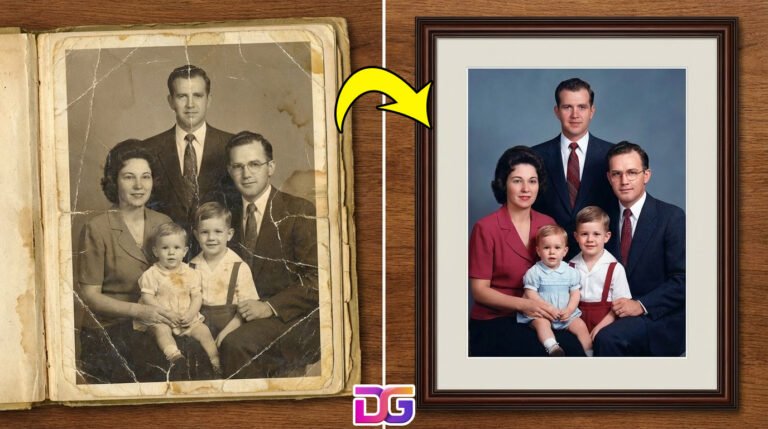
AI photo restoration prompts automate complex editing tasks like generative inpainting, super-resolution upscaling, and neural colorization. Therefore, users completely bypass hours of manual Photoshop work. You simply upload a damaged image, apply a targeted text instruction, and the multimodal AI repairs the visual degradation instantly.
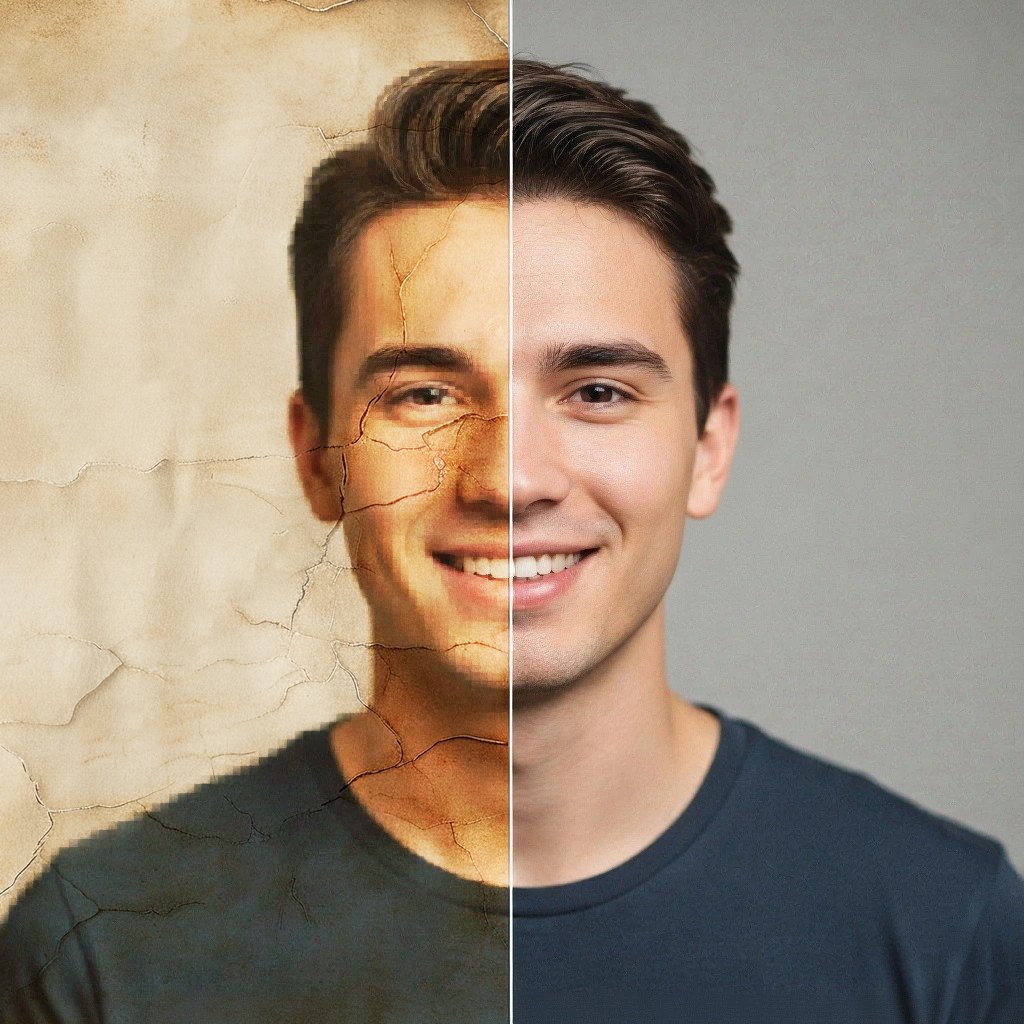
Manual photo restoration historically required specialized design skills. While hiring a professional photo conservator on Fiverr remains the best option for museum-grade archiving or severely shredded prints, generative AI flips this outdated model entirely for everyday image repairs. Generative AI flips this outdated model entirely. Modern platforms utilize latent diffusion models to understand deep image context. Specifically, premium SaaS tools like ChatGPT Plus and Google Gemini analyze visual degradation accurately. Subsequently, they reconstruct missing pixels mathematically based on your text inputs. To eliminate the artificial ‘plastic’ smoothing common in base models, run the final output through a neural upscaler like Magnific AI to inject photorealistic skin textures.
Feature
Traditional Manual Editing
AI Prompt-Based Restoration
Cost
$50 – $300+ per photo
Included in standard AI subscriptions
Time Required
Hours to days
15 to 30 seconds
Skill Level
High (Advanced software knowledge)
Zero (Copy and paste text)
Detail Recovery
Relies on manual cloning
Uses neural network prediction
Click here to display content from www.fiverr.com.
The Core Workflow for AI Photo Restoration Prompts
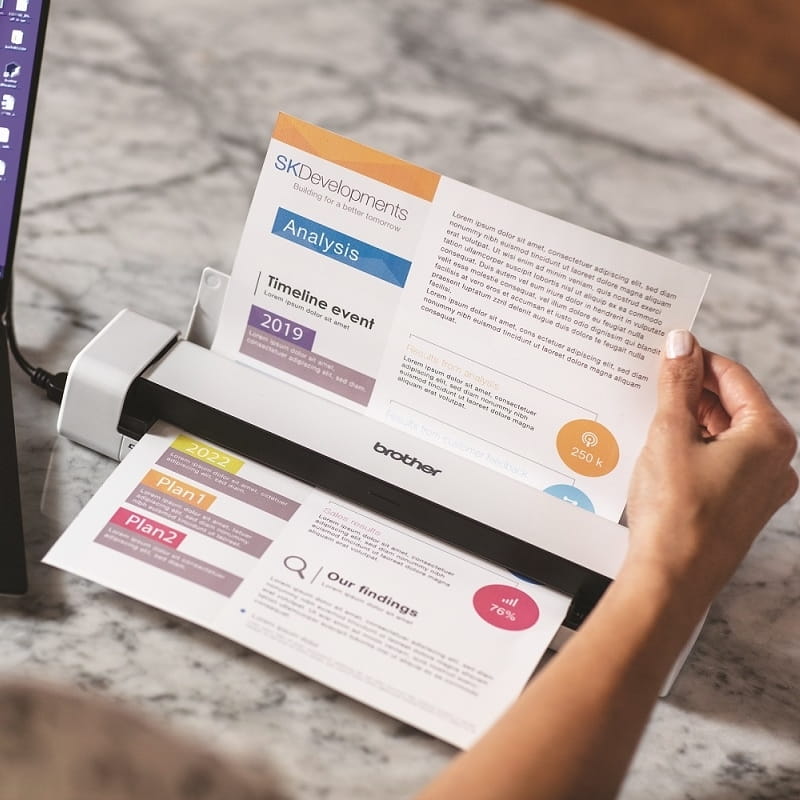
To use AI photo restoration prompts effectively, you must select a capable multimodal AI model. First, digitize your physical image via a dedicated high-resolution photo scanner, as smartphone camera glare destroys the raw pixel data the AI requires for accurate reconstruction. Next, upload the file directly to ChatGPT Plus or Google Gemini. Finally, paste your specific restoration prompt and download the repaired output.
Execution matters significantly more than the software itself. Therefore, you must start with a high-quality digital scan. Uploading a blurry smartphone photo of a physical print severely limits the AI’s processing capability. Once digitized, feed the raw image into your chosen AI platform. Crucially, you should iterate on the results if the first generation feels over-processed.
The complete one-shot restoration prompt addresses multiple degradation vectors simultaneously. Specifically, it targets sharpness, color fading, and physical damage in a single unified instruction. Consequently, this approach works best for users who need a comprehensive fix without diagnosing individual image issues manually.
Sometimes, an archival image suffers from every possible issue. Fading, tearing, and heavy grain destroy the visual clarity. Consequently, you need an instruction that forces the AI to analyze the entire spectrum of damage. Importantly, this specific command includes strict constraints to preserve the subject’s original identity safely.
Prompt:
Restore this photograph comprehensively and professionally. Analyze every visible form of damage or degradation, including scratches, tears, creases, stains, fading, discoloration, blur, noise, and grain and correct each one carefully. Sharpen soft edges and facial features naturally, without over-processing. Repair or reconstruct any missing areas by intelligently matching the surrounding textures, colors, and tones. Where colors have faded, restore them to vibrant, realistic values that suit the original era of the photo. Adjust brightness and contrast so that all areas of the image are clearly visible, with no blown-out highlights or lost shadow detail. Preserve the complete facial identity and natural likeness of every person in the image without alteration. Upscale the final output to the highest possible resolution — Full HD or above — with a clean, photo-realistic finish that looks like a professionally restored print.
The professional portrait revival prompt specifically rebuilds facial details using high-end camera semantics. Therefore, it instructs the AI to mimic the exact optical depth-of-field of advanced hardware like the Canon EOS R5. Ultimately, this technique restores skin texture and eye clarity while preventing the artificial aesthetic common in basic filters.
Portraits require extreme computational precision. Generative models often over-smooth faces aggressively. Therefore, you must anchor the AI to professional photography standards. By referencing specific mirrorless cameras, you force the neural network to respect natural depth of field. Furthermore, this ensures authentic, human skin tones.
Prompt:
Restore and enhance this portrait photograph to the visual quality standard of a professional studio shoot captured on a Canon EOS R5 mirrorless camera. Remove all visible damage including scratches, tears, grain, noise, blur, and discoloration. Restore accurate, natural skin tones with lifelike texture — pores, fine lines, and natural variations should be visible but refined. Sharpen the eyes to achieve a natural sparkle and clarity without artificial enhancement. Define hair strands and clothing fabric naturally. Do not alter the person’s actual facial structure, age, or identity in any way — restore what is already there, do not recreate or beautify. Correct the color balance so that whites are white, shadows retain detail, and the overall palette feels warm and naturally lit. Upscale to a minimum of 4K resolution with smooth tonal gradations and a finish consistent with a high-end professional portrait print.
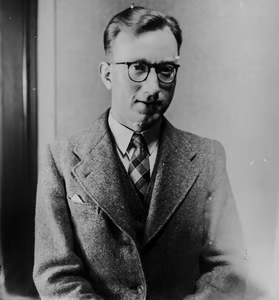
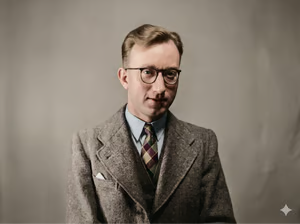
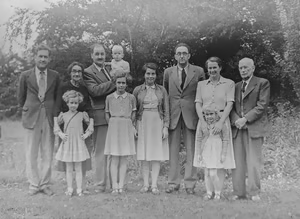
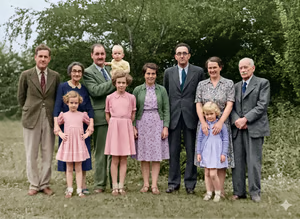
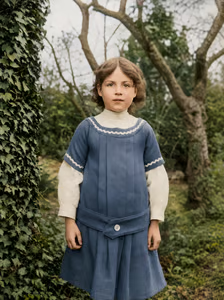
Authentic colorization prompts force the AI to apply historically accurate period colors. Consequently, the AI references historical dataset training to recreate realistic earth tones and natural lighting. This actively prevents the garish, oversaturated artificiality often seen in automated mobile colorization apps.
Adding color to monochrome images carries significant emotional weight. However, it also presents severe technical challenges. Poor colorization instantly ruins the historical integrity of the photo. Therefore, your text instructions must demand historical realism. The AI must preserve the original tonal depth perfectly while injecting mathematically plausible hues.
Prompt:
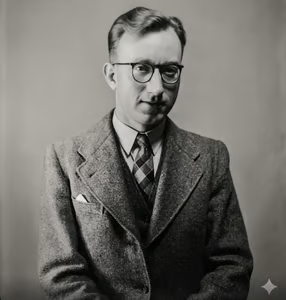
Colorize this black and white photograph with careful attention to historical accuracy and natural realism. Use your knowledge of the photo’s approximate era to apply period-appropriate colors to clothing, furnishings, vehicles, and environmental elements, for example, muted earth tones and wool fabrics for early 20th century, or brighter synthetic colors for mid-century modern periods. Apply realistic, natural skin tones to all people in the image, with subtle variations for light sources and shadow. Preserve all shadows, highlights, and tonal depth from the original monochrome image; do not flatten the lighting when adding color. Ensure the sky, foliage, and architectural elements receive colors that are plausible for the scene’s location and season. The final colorized image should feel as though the original photographer had a color camera, not as though a digital painting was applied on top of a photo. Clean up any existing scratches, grain, or damage during the process and output in the highest available resolution.
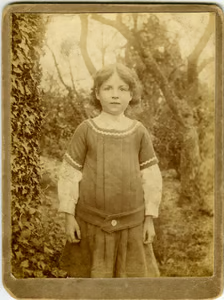
Original photo via Unsplash
Restoration via Gemini
Click here to display content from www.fiverr.com.
4. Surgical Repair Prompt for Physical Damage
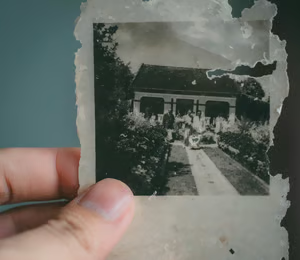
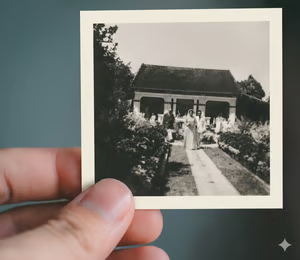
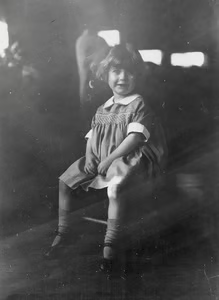
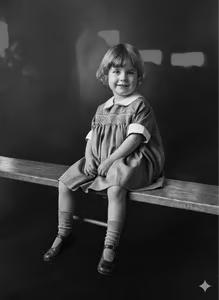
Physical damage requires localized generative inpainting parameters. This specific prompt directs the AI to act as a digital conservator. Therefore, it targets deep creases, water stains, and torn edges directly. The AI intelligently samples surrounding pixels to seamlessly rebuild missing visual information.
Water damage and physical tears permanently erase pixels. Consequently, standard sharpening tools fail completely here. You must utilize AI photo restoration prompts that explicitly trigger content-aware reconstruction. The AI calculates the exact mathematical probability of the missing textures. Finally, it fills the structural gaps flawlessly.
Prompt:
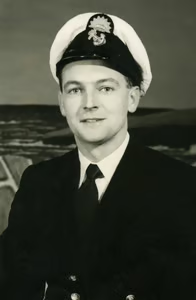
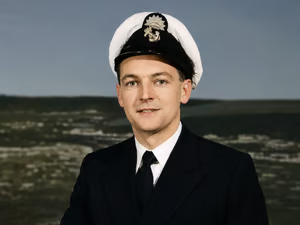
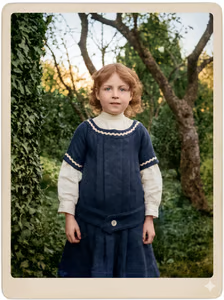
Act as a professional photo conservator and repair all physical damage in this image. Specifically, target and remove deep creases, water stains, surface scratches, and frayed edges. Rebuild any missing portions of the composition by intelligently sampling the surrounding environment and textures. Ensure the repairs are invisible and do not distort the original subjects. The final image should be smooth, clean, and appear as though it has never been damaged.
Original photo via Unsplash
Restoration via Gemini
Restoration via ChatGPT
Click here to display content from www.fiverr.com.
5. Lighting and Exposure Correction Prompt
Exposure correction prompts function like a high dynamic range upgrade for vintage photos. Specifically, they command the AI to recover shadow detail and reduce blown-out highlights. This balances the lighting mathematically, revealing hidden textures previously lost in underexposed or overexposed zones.
Vintage flashbulbs frequently ruined photo exposure. Furthermore, bad chemical development left early images muddy and dark. Using exposure-specific instructions forces the AI to remap the lighting curves entirely. Therefore, you recover critical background details that remained completely invisible for decades.
Prompt:
Optimize the lighting and contrast of this image to reveal hidden details. Brighten underexposed or shadowy areas, especially faces, without introducing grain. Simultaneously, recover details in overexposed or ‘washed out’ sections. Adjust the overall contrast to add depth and dimension, making the subjects stand out clearly. The final output should have a balanced, naturally lit appearance as if it were professionally lit in a studio.
The deep detail recovery prompt executes a complex, six-stage archival restoration pipeline. It systematically guides the AI through damage assessment, structural repair, tonal correction, detail enhancement, and super-resolution upscaling. Consequently, it rescues severely degraded photographs that simpler prompts simply cannot fix.
Severely damaged images require extreme computational intervention. Therefore, simple one-line instructions fail to salvage them. You need AI photo restoration prompts that dictate a strict operational sequence. This master prompt chains multiple latent capabilities together. Ultimately, it ensures maximum detail recovery while strictly protecting the historical identity of the human subjects.
Prompt:
Perform a full, multi-stage deep restoration of this photograph, treating it as a professional archival restoration project. Work through the following stages systematically: Stage 1 — Damage Assessment: Analyze the entire image and identify every form of degradation present, including physical damage (tears, scratches, folds, stains), chemical deterioration (fading, yellowing, discoloration), optical issues (blur, grain, noise), and resolution limitations. Stage 2 — Structural Repair: Reconstruct all physically damaged or missing areas using intelligent context-aware inpainting, ensuring all repairs are completely seamless and match the surrounding visual content. Stage 3 — Tonal and Color Restoration: Restore the full dynamic range of the image — recover shadow detail, reduce blown-out highlights, and rebalance the overall exposure. Correct all color casts and restore accurate, natural colors throughout, particularly for skin tones, foliage, sky, and fabrics. Stage 4 — Detail Enhancement: Apply targeted sharpening to all areas of the image, with greatest precision on human faces. Restore fine details including hair, eyelashes, skin texture, clothing weave, and background elements. Reduce all noise and grain while preserving natural photographic texture. Stage 5 — Super-Resolution Upscaling: Upscale the fully restored image to the highest resolution available — targeting 4K or above — using AI super-resolution to reconstruct fine detail consistent with the image content. Stage 6 — Final Finishing: Apply a warm, natural finishing grade that makes the image feel beautiful and lifelike. Introduce a very subtle vignette and ensure color richness and tonal depth throughout. Throughout all stages, preserve the complete identity and likeness of every person in the photograph without alteration. Deliver the final result as a pristine, print-quality image that looks professionally restored.
AI photo restoration prompts allow users to repair faded or damaged images using tools like ChatGPT and Google Gemini. The most effective workflows involve specific text instructions for damage assessment, super-resolution upscaling, colorization, and structural repair. By pasting engineered prompts into generative AI platforms, users can instantly recover lost details and fix old photographs without professional software.
Physical photographs degrade over time. Specifically, scratches, fading, and water damage destroy irreplaceable memories. However, you no longer need expensive software to fix them. By using precise AI photo restoration prompts, anyone can instantly repair damaged images. Consequently, generative AI handles the complex pixel reconstruction in seconds.
Elena is obsessed with pushing the boundaries of AI image generation. She spends her days reverse-engineering stunning visuals and crafting the exact, detailed prompts needed to get gallery-quality results. She absolutely hates the "plastic AI look" and focuses on teaching people how to generate high-resolution, print-ready digital files, seamless repeat patterns for textiles, and aesthetics that look 100% human-made.






0 Comments